Note: If you are using Brady Workstation software, the settings of the software can overwrite the settings on the printer. If the use Printer Settings are unchecked in Brady Workstation, the cut options in Brady Workstation override what is on the printer. Brady Workstation - How to Set Label Cutting Options. Cutting options set in ZPL script override the setting on the printer also.
If you are using a 3rd party label creation software, the printer driver settings on the computer can also overwrite the printer settings. To access the i4311 driver from Windows 11, navigate to the "Printers & Scanners" Windows application > Printer Properties > General > Preferences.
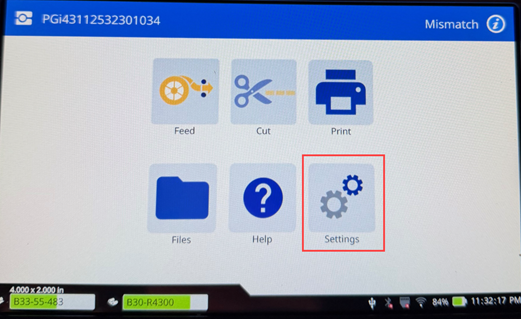
- Tap Settings.
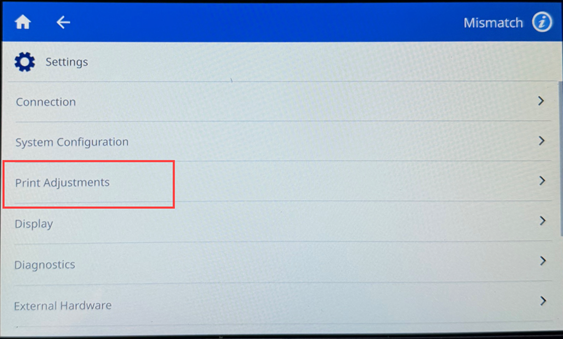
- Tap Print Adjustments.
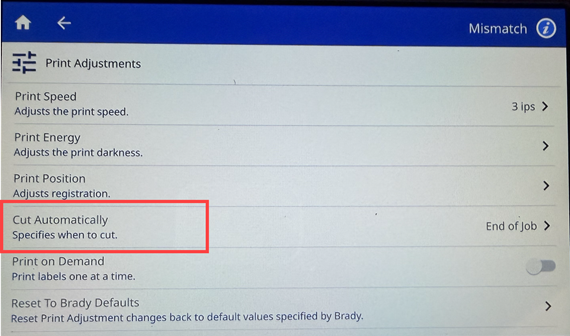
- Tap Cut Automatically.
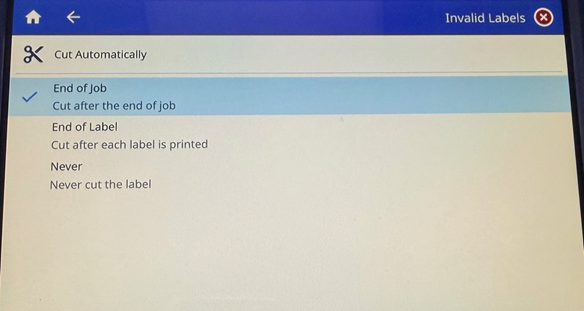
- Select the Cut setting: End of Job, End of Label or Never.
A blue checkmark will indicate which settings is selected.
Related Information


