Issue
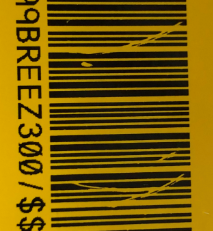
There are voids or lines that appear in the printed text on the label.
Troubleshooting
- Tension the ribbon by rotating the rewind spool (top spool) in a downward direction until all slack is removed.
- Try another ribbon cartridge.
- Clean the printer: i4311 - Cleaning & Preventative Maintenance
If the issue still persists, contact Global Brady Technical Support (Contact Information) and provide the part number and lot number of the label and ribbon What Is The Label/Ribbon Part Number and Lot Number?.


