The embedded web server allows remote access to printer settings. Perform diagnostics, upgrade firmware and a host of other features.
- To access the embedded web server for the i4311 printer, open a web browser (Google Chrome, Microsoft Edge, etc..).
- Enter the IP address of the printer in the address bar. i4311 - How to View IP Address.
Note: The printer must be connected to the same network as the computer. If the network is different, the Embedded Web Server will not open.
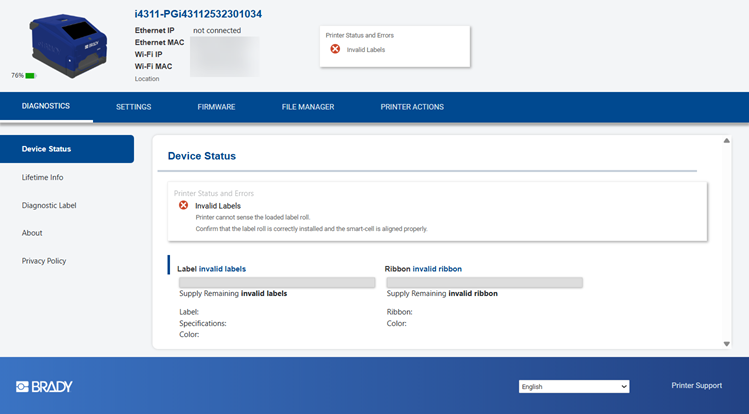
The following information and settings display in the Embedded Web Server:
Diagnostics
- Device Status
- Lifetime Info
- Diagnostic Label
- About - Firmware and Label Library Versions, MAC addresses, Internal and external storage and printer serial number
- Privacy Policy
Settings
- Print Adjustments - Print speed, print energy, print position adjustment, print on demand, cut automatically
- Connection - wired, wireless or other settings
- Wi-Fi Settings
- Bluetooth Settings
- Printer Password
- System Configuration
- ZPL Settings
Firmware
- Firmware
- Printer Label Library
File Manager
- Available space
- Files stored on the printer
Printer Actions
- Restart Printer
- Stop/Resume Print


