Issue
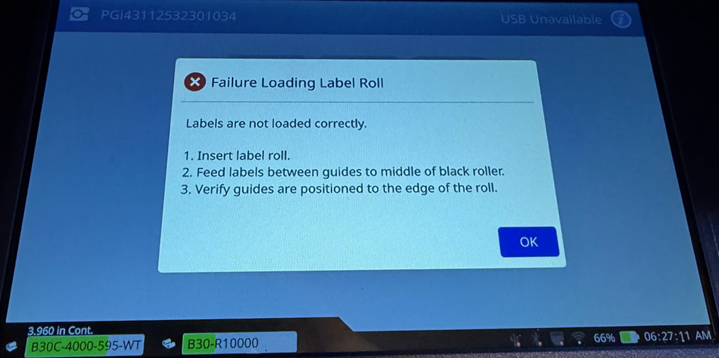
The i4311 displays failure loading supply or load failure and will not feed labels.
Cause
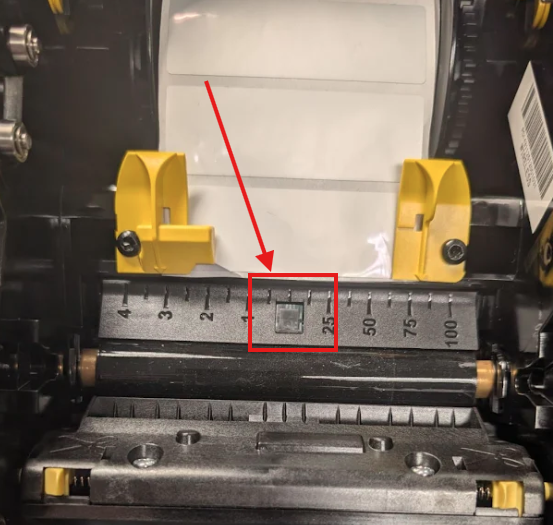
The labels are not positioned over the top of the media sensor like in the example below.
Troubleshooting
- Ensure the leading edge of the media is resting on the black platen roller and the yellow media guides are positioned correctly on each side of the label liner. i4311 - How to Load Labels and Ribbon
- Try another label or ribbon roll.
- Check for any debris or adhesive residue that could be obstructing the labels from feeding through the printer. i4311 - Cleaning & Preventative Maintenance.
If the issue persists, contact Global Brady Technical Support Contact Information for your region and provide the serial number of the printer i4311 - Serial Number Location, and the catalogue & lot numbers of the label and ribbon rolls: What Is The Label/Ribbon Part Number and Lot Number?
Related Information


