When the labels are no longer being cleanly torn from the roll, it is time to replace the tear plate. Alternatively, the standard tear plate can be changed out with the optional serrated tear plate.
Required Tools: M5 Torx screwdriver
Standard Model
Purchase the standard model tear bar on BradyID.
- Turn off the printer.
- Disengage the printhead locking lever to lift the printhead.
- Remove the (2) screws holding the tear plate and replace.
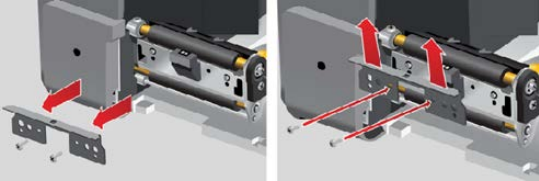
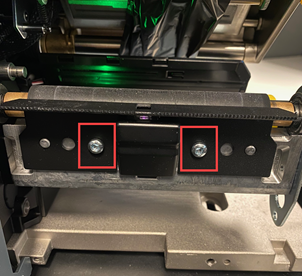
- Close the printhead locking lever.
- Close the cover and plug in the power cord.
Peel Model
Purchase the Peel model Tear Plate on BradyID.
- Disengage the printhead locking lever to lift the printhead.
- Open the peel door.
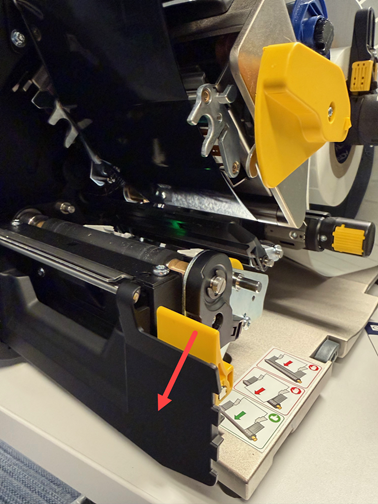
- Loosen, but do not remove, the two screws then lift up and slide out the peel plate.
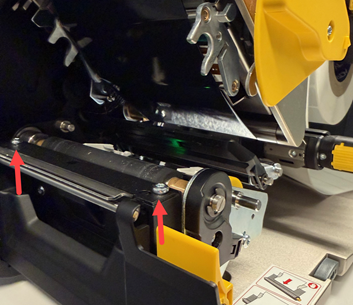
- Insert the peel plate so that it rests on the locator pins and tighten the screws.
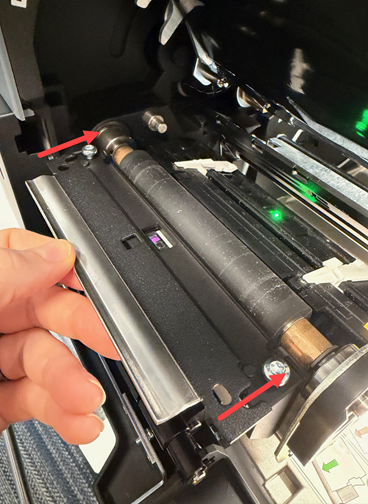
- Close the peel door.
- Close the printhead locking lever.
- Close the cover and plug in the power cord.


