The Label Taken Sensor can only be used with the i7500 Peel model. This accessory is sold separately and can be purchased on BradyID.
The Label Taken Sensor is only compatible with the i7500 Peel model printer. It can be installed to determine when a label is removed and automatically triggers the next label to peel and present. If the Label Taken Sensor is not installed, the button must be tapped on the touchscreen to peel and present each label.
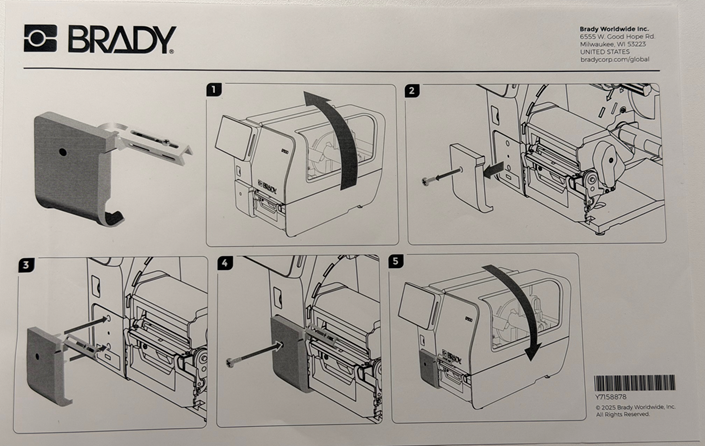
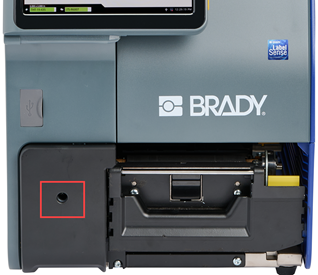
- Remove the accessory port screw using the T-20 wrench included with the printer.
- Remove the accessory port cover.
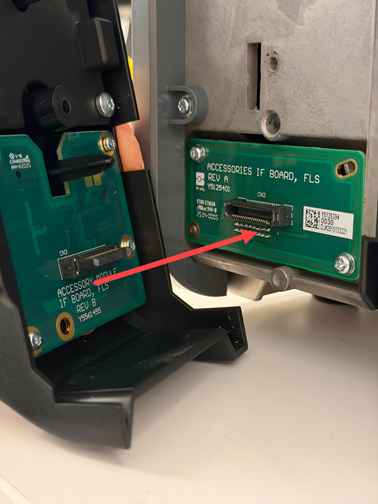
- Line up the board on the Label Taken Sensor to the accessory port on the i7500.
- Attach the screw using the T-20 wrench.
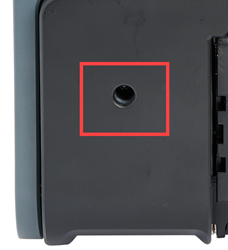
- Adjust the Label Taken Sensor position if needed by using the T-20 wrench to loosen the sensor. Slide the sensor to the desired location and tighten the screw.
- Review the settings on the printer to ensure the sensor is setup correctly:
- Ensure the blue light is lit up and adjust the light to the center of the labels.
- On the LCD screen press Settings, Print Adjustments and select Printer Mode. The current Operating Mode should be set to Peel Mode.
- Select Auto Next under Mode Configuration.
- Send a print job to the printer.


