Body |
- On the home screen, tap Settings.
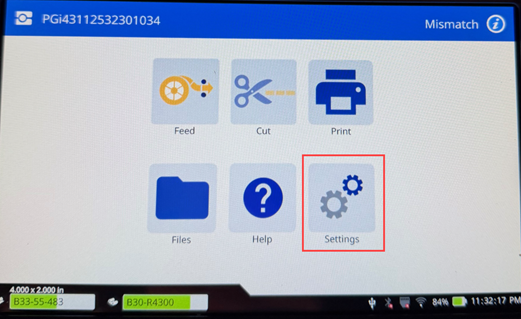
- Tap Connection.
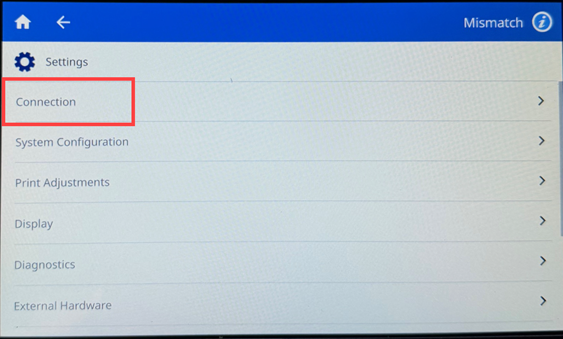
- Tap Advanced Network Settings.
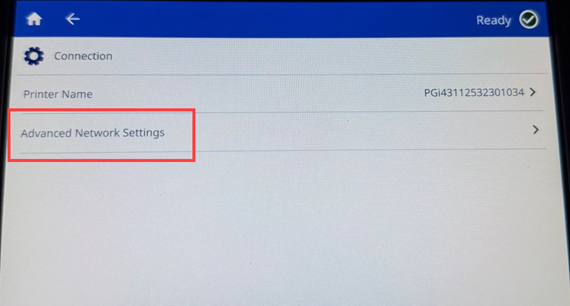
- Tap Ethernet.
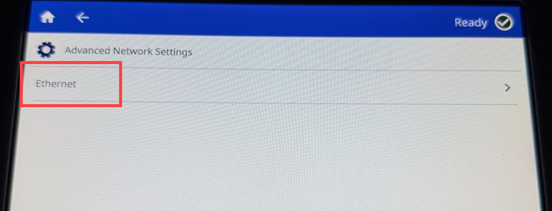
- Tap IP Settings, and then choose either DHCP or Static.
- DHCP: DHCP addressing is dynamic and the system users a DNS server to obtain the printer IP address for you.
- Static: For static addressing, you must supply the printer's IP address. First, tap the back button. Press the back arrow to return the Ethernet screen, then fill in the following information. You may need to get assistance from your network administrator.
- IP Address: Enter the printer's IP address.
- Subnet Mask: Enter a subnet mask if you are using one.
- Default Gateway: Enter the IP address of the default gateway.
- DNS Server (Primary): Enter the IP address of the primary DNS server.
- DNS Server (Secondary): Enter the IP address of the secondary DNS server.
Note: If no DNS server is being used, enter 0.0.0.0 for both the primary and secondary DNS servers.
- Tap the back arrow button to return to the Advanced Network Settings screen in order for the fields entered to take effect.
Note: Ethernet Data Rate = 10/100/1000 Mbps
|
|
|---|

