Issue
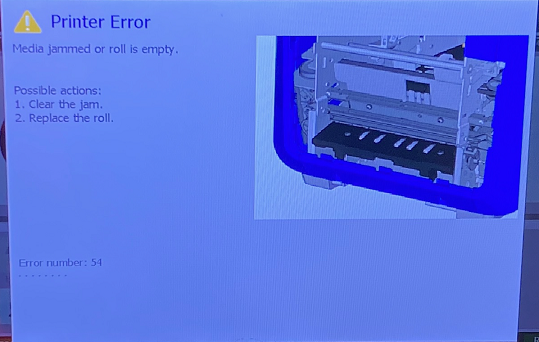
The printer screen displays "Printer Error - Media jammed or roll is empty". Error number: 54.
Troubleshooting
- Confirm the ribbon or label media is not at the end of the roll. Replace ribbon and labels to verify the issue is not caused by the media.
- Make sure the printer has been cleaned (see section for cleaning the cutter blade):
- If there is a jam, clear by gently removing any crumpled media from the path or by removing the media roll, manually cut off the crumpled tape, and then re-insert the media.
- Verify the label is on the correct side of the label roll.
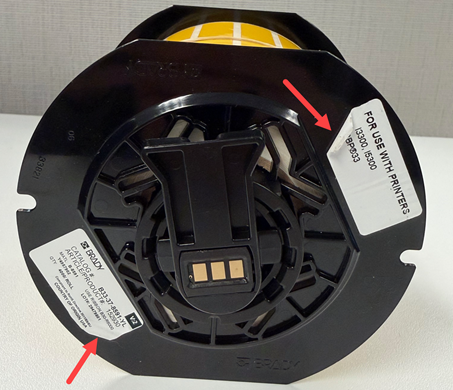
S3700 and BBP37 - If the label on the side of the gears starts to peel off, it may get stuck or hit the side when the label prints.
- If you hear a grinding noise before printing, contact Brady Technical Support for your region: Global Brady Technical Support (Contact Information).
Important: The BBP30, BBP31 and BBP33 printers are no longer repaired or supported: Obsolete Brady Printers - No longer supported or repaired.
- Verify the labels on the roll flanges aren't peeling. If the labels are peeling, it can catch inside the printer and cause jams.
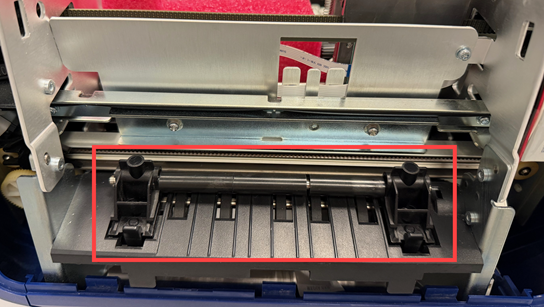
- BBP35 / BBP37 / S3700 - Verify the Eject Roller is properly aligned and fully engaged.
-
- To remove the cover, press the internal tabs located on both sides of the printer.
-
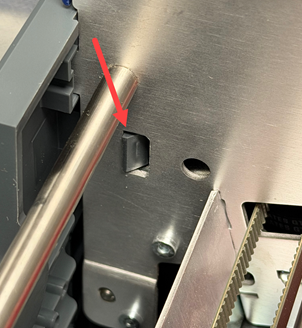
- Once the cover is removed, there are two tabs for the eject roller. Verify the eject roller is seated properly and is not sticking up.
Still Not Working?
Mechanical failure may have occurred, contact Brady Technical Support for your region: Global Brady Technical Support (Contact Information) with your serial number:


